How to read a Digital Product Passport
A Digital Product Passport (DPP) is the public record of a battery product: what it is made of, how it performs, who made it, and how it should be handled at the end of its life. Anyone can open a passport, no account or login is required. This page explains what you see when you land on one.
You usually reach a passport by scanning the QR code on a product or its packaging. For how that scan works, see QR codes and the resolver.
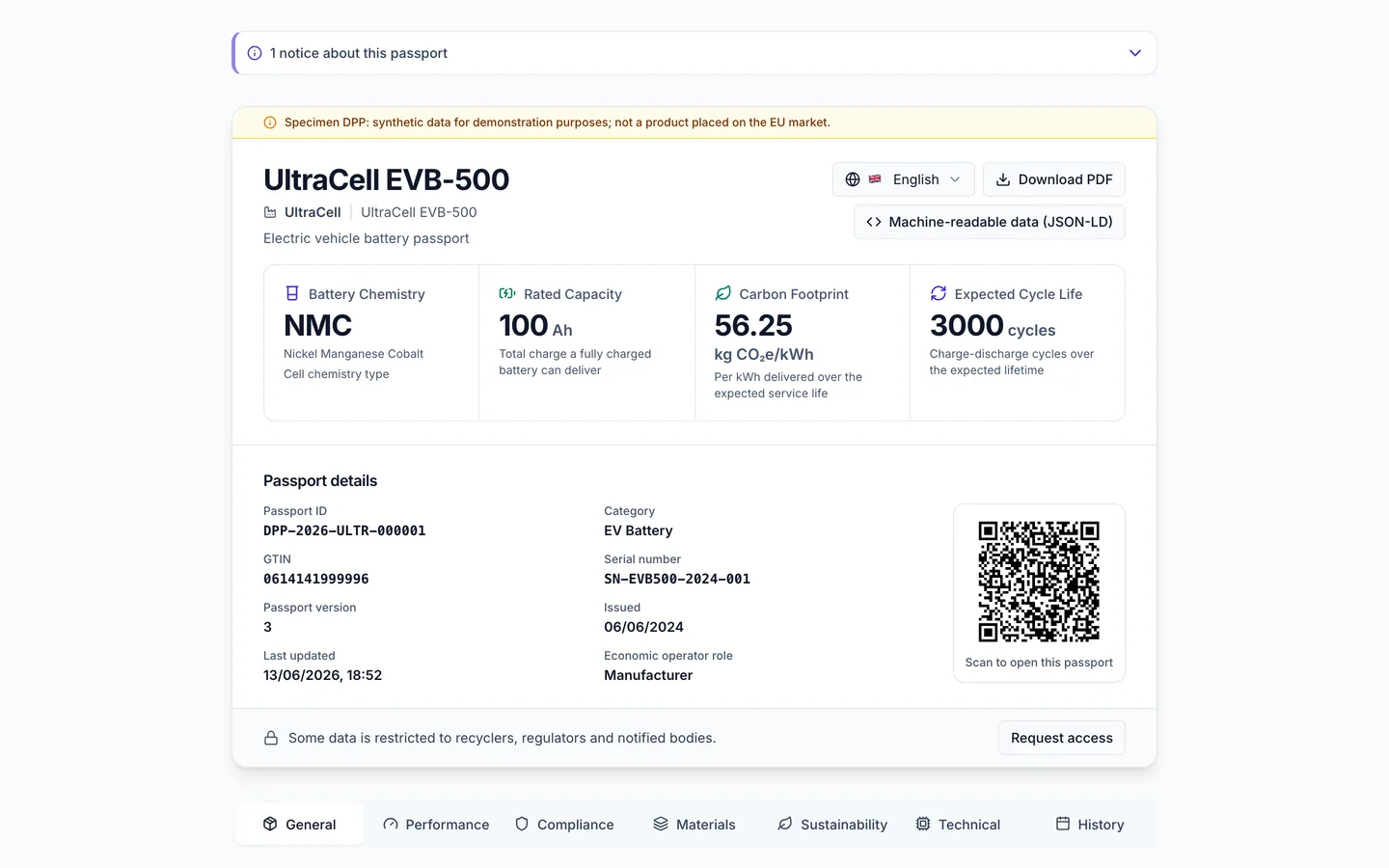
The public passport a QR scan opens.
What the page shows
A passport opens with the product name, its brand, and (where provided) a product image, followed by structured sections of data. The exact tabs depend on the product category, but they generally cover:
- General product identification and the manufacturer behind it
- Performance figures
- Compliance and certificates
- Materials and composition
- Sustainability information such as recycled content and carbon footprint
- Technical specifications and metadata
- History of key events in the product's life
Only tabs that have data are shown.
Where a battery is made up of linked components, the passport also lists component DPP links so you can open the passport for each part.
Sections only show information the manufacturer has actually provided. A field with no value is not shown at all, a section with no values disappears, and a tab with no sections is hidden.
A manufacturer who has no hazardous substance or critical raw material to list can declare instead that none is present. The Materials tab then lists the manufacturer's own statement, "The manufacturer declares no hazardous substance (CLP) other than mercury, cadmium or lead is present." or "The manufacturer declares no critical raw material is present." The statement is shown only when the manufacturer has made it. It is a declaration by the manufacturer, in the same way as the rest of the passport data.
The toolbar
Near the top of the passport is a small toolbar with these controls:
- Language selector (a globe icon followed by the current language name): switch the passport between English, Deutsch, Français, Español, Italiano and Nederlands. See Language below.
- Download PDF: save a PDF copy of the passport.
- Machine-readable data (JSON-LD): open a panel titled "JSON-LD Structured Data (Schema.org + ESPR)" that shows the passport's public data in a structured format, with a Download button. This is the same data other software can read.
Traceable does not independently verify the data in a passport. The economic operator is responsible for it, as the passport's legal disclaimer says.
Language
The language selector translates the passport interface (tab names, field labels, and section headings) immediately into any of the six supported languages: English, German, French, Spanish, Italian and Dutch.
The German and Dutch labels for battery fields use the terms of the official German and Dutch texts of Regulation (EU) 2023/1542. For example, the German passport calls the manufacturer "Erzeuger", the term the regulation uses.
The manufacturer's own text values are not translated. They stay in the language the manufacturer entered them in. After you choose a language, a message that starts "Translated to" and names the language appears with the note "Product data values shown in original language."
The notice on a passport whose company is no longer maintained on Traceable is shown in the language you chose, with its date written for that language. The other withdrawal and archive notices are shown in English in every language.
Withdrawn products
If a manufacturer has withdrawn a product, its passport stays available for batteries already on the market, with a notice at the top that says it has been withdrawn, together with the date, the reason and any contact details the manufacturer supplied. If the reason is a safety or non-conformity one, no certificate or document shows a verified mark. A passport withdrawn because the product was found to be counterfeit shows the notice only and none of the product data. See QR codes and the resolver for what happens to the underlying link.
Trust and privacy
Every passport carries a disclaimer and a footer with the legally required manufacturer identification and data-protection information. The passport is a read-only public record: opening one does not create an account, and it does not ask you for personal information. Where some data is restricted, a Request access button opens a form that does ask for an email address, full name, organisation, role and purpose.