Profile
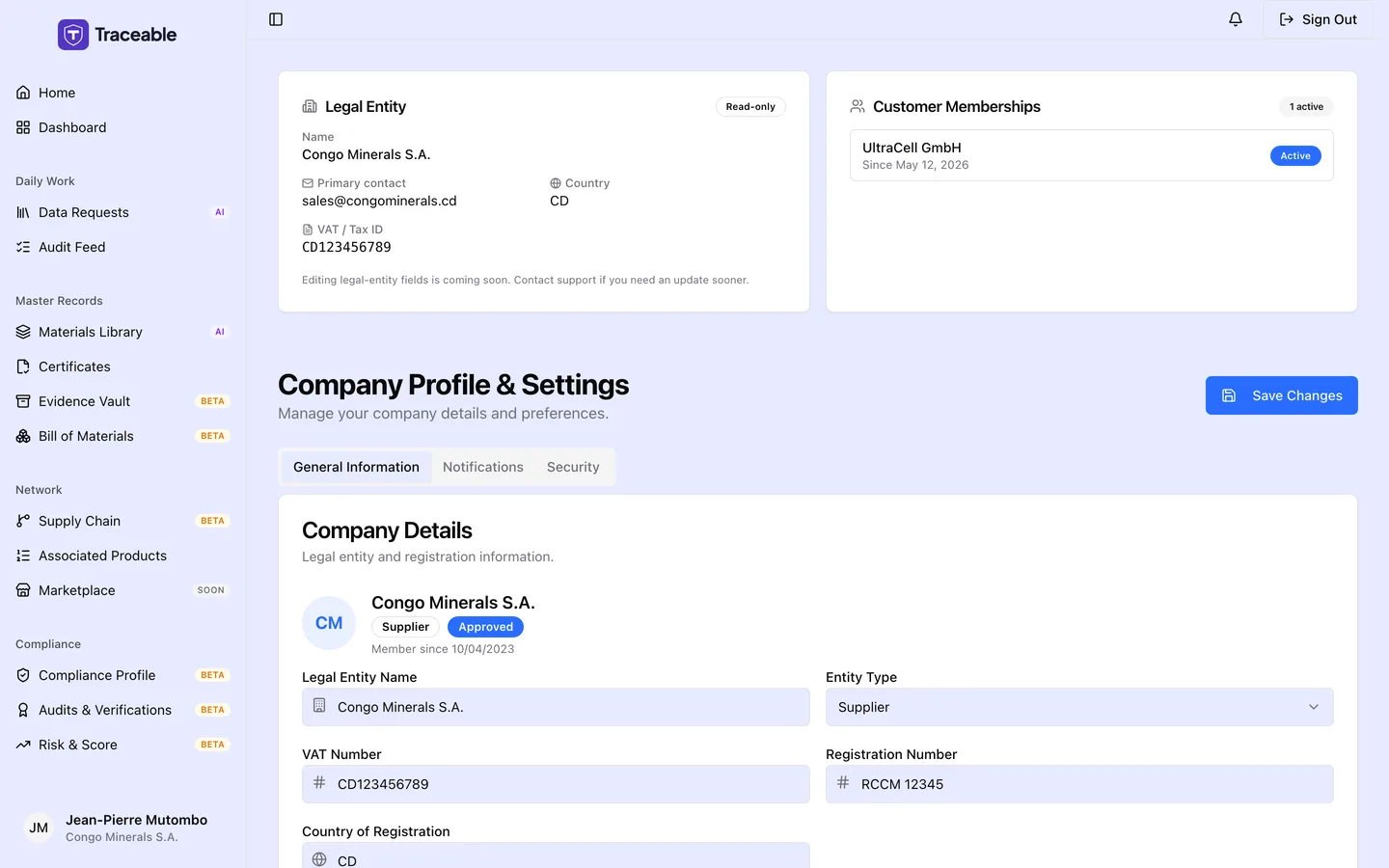
Settings and profile.
Legal Entity and Customer Memberships
Above the profile form are two read-only cards.
Legal Entity shows Name, Primary contact, Country and VAT / Tax ID, with the note "Editing legal-entity fields is coming soon. Contact support if you need an update sooner."
Customer Memberships lists each customer you are linked to with "Since <date>" and a status tag (Active, Pending or Revoked), with a count such as "2 active". If your account is not yet linked, a banner reads "Cross-customer identity not yet linked ... This typically happens within 24 hours."
Company Profile & Settings
The page is titled "Company Profile & Settings" and has three tabs: General Information, Notifications and Security.
General Information
General Information has two cards.
Company Details
| Field | Notes |
|---|---|
| Legal Entity Name | Your registered legal entity name |
| Entity Type | Manufacturer, Brand Owner, Supplier, Importer, Verifier or Component Manufacturer |
| VAT Number | Shown, but changes are not saved |
| Registration Number | Shown, but changes are not saved |
| Country of Registration | Country where you are registered |
| Primary Address | Your business address |
Contact Information
| Field | Notes |
|---|---|
| Contact Email | Shown, but changes are not saved |
| Phone Number | Optional |
Notifications
Two switches, Email Notifications and Browser Push. The screen says these preferences apply to this browser session only.
Security
An Authentication card and a Data Protection card.
How to Update Your Profile
- Select Settings & Profile in the sidebar.
- Change the fields you need.
- Select Save Changes (top right). A message reads "Profile updated successfully".
You can change Legal Entity Name, Entity Type, Country of Registration, Primary Address and Phone Number. The name needs at least 2 characters and the address at least 5.
What You Cannot Change From Your Profile
Sign-in email address. Your sign-in email cannot be changed in Settings & Profile. The Contact Email field is shown, but changes to it are not saved. To change your sign-in email, contact Traceable support.
VAT Number and Registration Number. These are shown, but changes to them are not saved.
Your Data (GDPR)
Your Profile page includes a Privacy & data portability area where you can export your own data at any time, without contacting support.
The Download a copy of your data action (the Download my data button) produces a single JSON file, named traceable-supplier-export-*.json, containing the personal and business data Traceable holds about you. The export is provided under GDPR Article 15 (Right of Access) and Article 20 (Right to Data Portability), so you can review what is held or migrate it to another platform.
The export bundles your audit log together with your other records (your supplier identity, customer memberships, team, data-request history, uploaded documents, and notifications). There is no separate audit-log button: the audit log is delivered inside this data export. Exporting is read-only and does not delete or change any of your data, and the fact that you ran an export is itself recorded in your audit log.