Company profile
Open Settings → Company profile in the left sidebar. The page shows Company Details, Legal entities, Regulatory Identifiers, Company Information, Passport details, Authorized Representative and GS1 Prefixes.
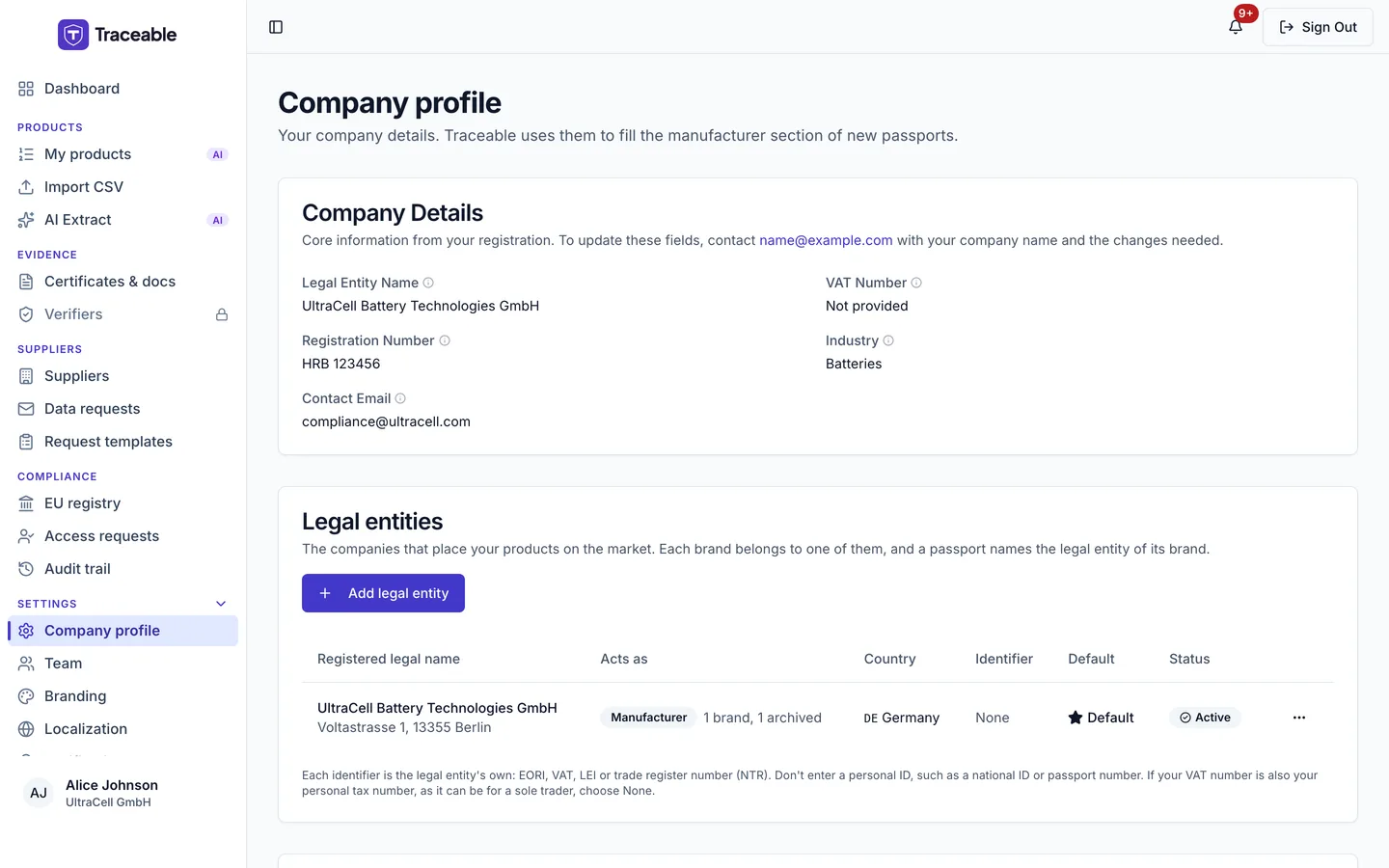
Company profile.
The page has no operator type setting. The operator role belongs to each brand: you set it on the brand, on the Branding page, and the Legal entities card shows it in its Acts as column. See Brands and legal entities.
Only a team Admin can save changes on this page. See Team Management.
Company Details
The Company Details card is read-only. It shows:
- Legal Entity Name
- VAT Number
- Registration Number
- Industry
- Contact Email
To change these, contact support so Traceable can check the new details.
To update these fields, contact support@traceable.digital with your company name and the changes needed.
Fields you can edit
Click Save Profile after editing. A toast says "Profile saved". Saving the profile is recorded in the audit trail.
| Card | Field | Notes |
|---|---|---|
| Regulatory Identifiers | EORI Number | Your EORI identifier. |
| Regulatory Identifiers | GLN (Global Location Number) | Exactly 13 digits. |
| Company Information | Registered Address | Editable. It is not locked. |
| Company Information | Company Size | Choose from the list. |
| Passport details | Passport contact email | Published on your passports. Separate from your sign-in email. |
| Passport details | Website | Must start with https://. |
| Passport details | Brands | Comma separated. |
| Passport details | Country | Choose from the list. |
| Passport details | EPR / producer registration numbers | One per line. |
| Authorized Representative | Representative Name | |
| Authorized Representative | Representative Address | |
| Authorized Representative | Representative Email |
There is no phone number field.
The GS1 Prefixes section at the bottom of the page has its own Save changes button. See GS1 prefixes.
Company logo
You set your company logo under Settings → Branding, not on this page. You upload the logo as a PNG, JPEG or WebP file. A web address is not accepted. A new logo is not shown in the preview, on your passports or in their PDFs until it has passed the malware check, and the page gives no message while it waits. See Branding.
Email address
The portal has no control to change your sign-in email address.
Password
The portal has no Change password button. To set a new password, use the password reset link on the sign-in page. You receive an emailed recovery link that opens the Set new password page.
- Enter the new password in New password.
- Enter it again in Confirm new password.
- Click Update password.
A password must be at least 8 characters and contain an uppercase letter, a lowercase letter, a number and a special character.
If your account has an authenticator app set up, resetting a forgotten password asks for the 6-digit code from the app before the new password is set. Accounts without an authenticator app are unchanged.
Email verification code
When you sign in, Traceable sends a verification code to your registered login email address. Enter it to finish signing in.
Deleting your account
You request account deletion under Settings → Privacy & data, not on this page. Any signed-in person can raise a request about their own account, whatever their team role.
- Open Settings → Privacy & data.
- In the Delete My Account card, click Request Account Deletion.
- In the dialog, you can enter a reason in Reason for leaving (optional).
- Click Confirm Deletion Request.
You are not asked for a password or a confirmation phrase.
What happens next:
- The request is not carried out at once. Traceable acts for your company as its processor, so the request is sent to the company that holds the data, which decides on it. See How an erasure request is decided.
- Erasure requests are given a deadline of one month from receipt, extendable by up to two further months where the law allows. A toast titled "Deletion Request Submitted" says: "Your request has been submitted. You will get an answer within one month. If it is complex this can be extended by up to two further months, and you will be told why within the first month."
- If you already have a deletion request open, the toast says "You already have a deletion request open." followed by the same sentences about the deadline.
- The dialog says "This action cannot be undone."
When the erasure is carried out:
- Deleted: the person's sign-in account, email preferences, notifications, AI consents, and the company's API keys.
- Anonymised: the person's email address becomes a placeholder of the form
deleted-xxxx@anonymous.local. - Kept: products are kept, with the erased person's email removed from them.
- If the person was the company's only user: the company name becomes "[Redacted]", the contact email becomes a placeholder, and the company's stored files are deleted.
- Audit logs: audit logs are never deleted. Personal data in them is redacted.
Support sessions
When Traceable support helps you, the session is read-only and covers only a fixed set of pages. On any other page, such as API keys, billing, data export and erasure, or AI runs, support sees a notice that the page is not available in a support session, with a way back to the dashboard.
When an account ends
- Cancelling a subscription sets the subscription to cancelled with an end date, moves the company to the Free plan and switches off the modules that are not part of the Free plan. It deletes nothing.
- Deleting a company is done by Traceable, and only for a company whose products are all Deprecated. It needs extra confirmation steps. It only sets the company to inactive. Documents, audit logs and users are kept.