Create a product
This guide walks through creating a new product and building its Digital Product Passport from scratch. The DPP editor is a step-by-step wizard: the steps, the fields, and which of them are required all derive from the battery category you select.
To begin, open Products > My products in the sidebar and click Add new product. On an empty product list the same action is the Start the wizard button.
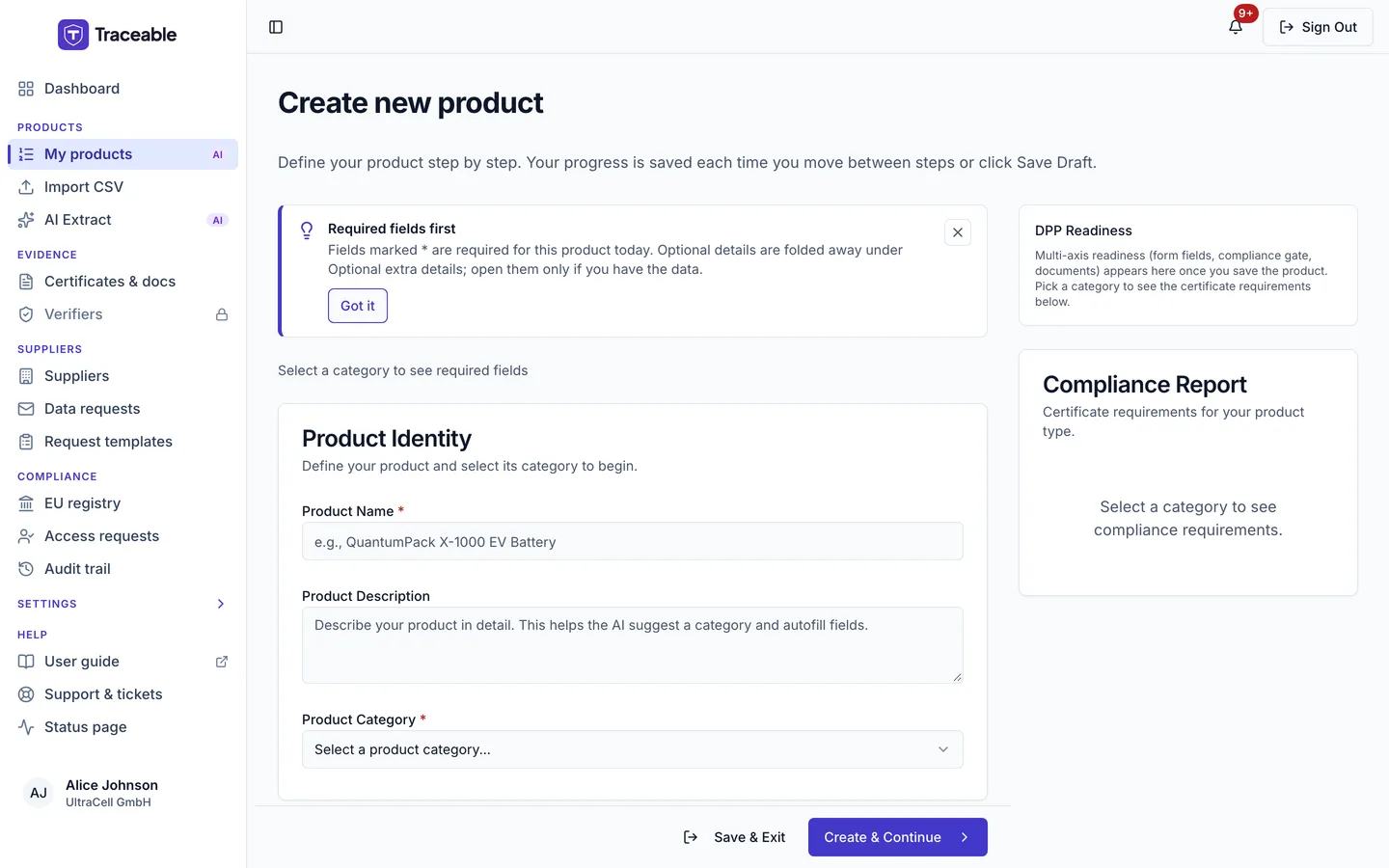
Starting a new product.
Step 1: Product Identity
The wizard always opens with Product Identity: the Product Name, an optional Product Description, and the Product Category. If your company works in more than one industry, an Industry selector appears too. The category is the most consequential choice in the flow because it determines the DPP schema (the full set of fields, which are mandatory, and the applicable regulatory thresholds).
The category dropdown lists DPP-mandated categories first, then voluntary-scope categories. Selecting a category outside the passport mandate shows an amber DPP Not Required notice. Its default wording says a Digital Product Passport is not required for that battery category under EU Battery Regulation 2023/1542 Art. 77(1) and that you can still use Traceable for internal compliance management.
Once a category is selected, the step shows a collapsible What you'll need to fill (N required fields across M steps) summary, so you know the size of the job before you start. It appears only while you are creating a product.
| Category | Code | Passport mandate | Notes |
|---|---|---|---|
| EV Battery | BAT-EV-001 | Mandated (Art. 77(1), from 18 Feb 2027) | Traction batteries for road vehicles |
| LMT Battery (e-bikes, e-scooters) | BAT-LMT-001 | Mandated (Art. 77(1), from 18 Feb 2027) | E-bikes, e-scooters and similar light transport |
| Other Industrial Battery (>2 kWh) | BAT-IND-001 | Mandated (Art. 77(1), from 18 Feb 2027) | Industrial machinery, forklifts, grid applications |
| Stationary Battery (>2 kWh) | BAT-STAT-001 | Mandated (Art. 77(1), from 18 Feb 2027) | Regulated as industrial under Art. 3 |
| Industrial Battery (≤2 kWh) | BAT-IND-002 | Voluntary | Outside Art. 77(1); see Voluntary battery passports |
| SLI Battery | BAT-SLI-001 | Voluntary | Starting, lighting, ignition batteries |
| Portable Battery | BAT-PORT-001 | Voluntary | Consumer and professional portable batteries |
The SLI and Portable templates are not yet offered on the production platform; their categories are currently selectable only on evaluation environments. Industrial ≤2 kWh (BAT-IND-002) is available everywhere and is the main voluntary-scope category in production use today.
How the wizard builds your steps
After Product Identity, the wizard adds one step per data section present in your category's template, and always ends with Review & Submit. The steps appear as numbered chips across the top of the editor; a chip turns green when its step is complete and red if it has validation errors, and you can click any chip to jump directly to that step. On narrow screens the chips become a drop-down. A small number on a chip counts the fields that step still needs.
The sections follow a canonical order. Which of them appear, and how many fields each carries, depends on the category. A mandated category shows about a dozen steps including Product Identity and Review & Submit. A voluntary category shows a single step of fields between the two. The sections, in order:
- Product Identification: the identifiers, including model, serial number, batch/lot, GTIN, ISO/IEC 15459 identifier, TARIC code, battery category, lifecycle status
- Manufacturer & Operator Details: the manufacturer, manufacturing place and dates, and the responsible economic operator
- Materials & Composition: chemistry, critical raw materials, recycled-content declarations, hazardous substances
- Carbon Footprint: the lifecycle carbon-footprint declaration and its verification references
- Sustainability & Circularity: durability, repairability and circularity data
- Performance & Durability: capacity, voltage, energy, cycle life, state-of-health parameters
- Safety, GPSR & Certificates: safety testing (UN 38.3 and related), GPSR contacts, certificates
- Regulatory Compliance: type-approval reference, applicable standards and passport lineage links
- Supply Chain Due Diligence: raw-material sourcing and the due-diligence statement
- End of Life & Recycling: dismantling, collection and recycling information
A template can also carry a separate GPSR step, which appears after End of Life & Recycling.
Within a step, fields render in template order. Your work is saved to the server when you click Next (Create & Continue on the first step), Previous, a step chip, Save & Exit or, on the last step, Save as Draft or Submit for Review. There is no background save to the server while you type.
How a field tells you whether it blocks publication
| Indicator | What it means |
|---|---|
Red asterisk (*) | Required to publish today. A field whose obligation has not yet reached its compliance date does not carry one |
| Grey note "Not required until ..." (for example "Not required until August 2027") | Shown on a field that starts to bind on a later date, so it does not block today. The carbon footprint and due-diligence fields below, and the per-metal recycled-content fields, carry no asterisk and do not block |
| Blue EU battery passport pill | The field is an EU battery passport data point. It appears on required fields and on not-yet-required fields, so it alone does not tell you whether the field blocks |
| Field tooltip | Says whether the field is mandatory for the category (or not required yet, and that it does not hold publishing back), with a Learn more link to the Regulation text and the field's help text |
Each step reports its own requirement load. A step with outstanding required fields shows a collapsible banner such as "11 fields on this step still needed". The wizard header shows "X of Y required fields complete" with a progress bar, and the Review step lists every remaining gap grouped by step, each with a Fix button that jumps to the field.
Voluntary battery passports
For categories outside the Art. 77(1) mandate (SLI, Portable, and Industrial ≤2 kWh), the wizard applies a voluntary rule-set:
- Only a short minimum set of fields remains required. For Industrial ≤2 kWh it covers the core identifiers, manufacturer name and address, chemistry, mass, rated capacity and energy, date and country of manufacture, hazardous substances, extinguishing agent, the separate-collection symbol and the CE declaration. Everything else is optional.
- The required-field counter, the step progress, the validation, and the readiness sidebar all use the same relaxed rule-set, so a voluntary Industrial ≤2 kWh product shows 16 required fields (the minimum set above), far fewer than a mandated category.
- On a voluntary category, certificate requirements (for example CE, REACH and UN 38.3 test summaries) are shown as recommended items. They do not hold publishing back. The CE declaration field itself is part of the minimum set.
- The published passport shows a notice that the passport is published voluntarily. See the public view.
The legal line stays crisp: these categories have no passport obligation under Art. 77(1). A voluntary passport is a product capability, not a regulatory requirement, and nothing about publishing one creates an obligation you did not otherwise have.
Date-gated obligations: what blocks publication today
Several Annex XIII obligations exist in the Regulation but have not yet reached their compliance date. The wizard and the publish gate follow the Regulation's own timeline, informed by the European Commission's "Digital Batteries Passport: data points by category" guidance (28 July 2026, updated 15 August 2026):
| Obligation | Categories | Blocks today? | Starts to bind |
|---|---|---|---|
| Carbon footprint declaration and verification | EV, LMT, Industrial, Stationary | No | Industrial, Stationary and EV: 18 Feb 2028. LMT: 18 Aug 2028 |
| Supply chain due diligence statement | All mandated categories and Industrial ≤2 kWh | No | 18 Aug 2027 (Art. 48, postponed by Regulation (EU) 2025/1561) |
| Recycled-content declarations | EV, LMT, Industrial, Stationary | No | EV, Industrial, Stationary: 18 Aug 2028 (Art. 8(1) first subparagraph). LMT: 18 Aug 2033 (Art. 8(1) second subparagraph). SLI is in Art. 8 scope but outside the passport mandate; see the timeline |
Two points on the carbon footprint row, because it changed in September 2026: the Commission's guidance marks the carbon-footprint declaration "not to be filled/displayed as of February 2027, format still to be specified in the upcoming implementing act" for all categories including EV. Traceable therefore no longer blocks publication on EV carbon footprint either, superseding the earlier position under which EV blocked from 18 February 2025. This is a suspension pending the implementing act, not a removal: the enforcement dates are recorded in the platform and blocking resumes automatically on each date with no migration and no manual step. Data you do declare in these sections is still checked for internal consistency; a failed check is shown as a warning until the date applies, then blocks.
The Regulation's obligations apply on their own dates, whatever the form does. In Traceable these fields are optional today and do not block publishing. If Traceable cannot determine a product's battery category, it treats every mandatory field as blocking rather than assuming an obligation does not apply.
Lifecycle status and passport lineage
Mandated battery templates carry a required Battery Lifecycle Status field with five values:
Original, Repurposed, Re-used, Remanufactured, Waste
New passports are pre-filled as Original and marked Pre-filled. Change it if the battery is not on its first use.
Two optional lineage fields accompany it in the Regulatory Compliance step: Original Passport URL (the passport of the battery this one was made from) and Linked Passport URN (the passport chain link). They become required at publish when the lifecycle status is Repurposed or Remanufactured, because a battery given a second life must point back at its original passport. A Re-used battery needs the same reference unless the passport lineage operation is answered None (direct re-use that never became waste). On voluntary categories this is shown as a recommendation.
Related category-specific datapoints from the same guidance alignment:
- EV: a required State of Certified Energy (SOCE) field (0-100%). State of health and state of charge on EV are optional (the guidance marks them not-to-be-filled for EV).
- Industrial and Stationary: Expected Cycle Life and its related endurance datapoints are checked when the declared industrial application is stationary energy storage (home or commercial/grid) or forklift duty: a missing value is reported as a warning in the publish check and does not block publishing. They stay optional for UPS, telecom backup, and the "Other" application, which is deliberately not conditioned.
TARIC code (commodity code, optional)
A commodity code is optional in Traceable. The platform does not require one.
The wizard field is labelled TARIC Code and sits in the Product Identification step. If you declare one for your own customs or logistics purposes, the canonical format is the 8-digit EU Combined Nomenclature (CN) code under heading 8507 (electric accumulators), for example 8507 60 00. A 10-digit TARIC code is also accepted: the platform validates it by its 8-digit CN root (the last two TARIC digits encode import measures, not product identity). Spaces and dots are accepted, so 8507 60 00 and 8507.60.00 both work. The code must be a listed 8507 subheading. This validation applies to products in scope of the DPP registry (EV, LMT, Industrial, Stationary).
Entering dates
Date fields open a calendar with month and year dropdowns, so reaching a manufacture date years back does not require paging month by month. The calendar covers years 2010 to 2035. You can also type the date directly in YYYY-MM-DD format, and a Clear button removes a value once one is set. Re-clicking the already-selected day closes the calendar without clearing your value.
The DPP Readiness sidebar
Alongside the wizard, the DPP Readiness panel shows what the platform actually knows about the product's path to publication:
- A Next step callout naming the single most useful next action, with the count of requirements remaining before submit
- Form Fields: filled versus required, with a progress bar
- Compliance Gate: "Passes", or the first five publish gaps, each with a Fix button that jumps you to the field or page that resolves it (gaps only an administrator can resolve are marked "Contact admin" instead), then a pointer to the Review & Submit step for the full list
- Recommended: non-blocking items, when there are any
- Documents: uploaded and required counts, and verified, pending and expired counts once something is uploaded
Progress through steps is not sequential; you can work in any order and let the readiness panel tell you what is still missing.
After creating a product
A newly created product is saved as a Draft when you click Create & Continue on the first step. From here you can:
- Continue filling the DPP steps
- Send data requests to suppliers for fields you do not hold directly
- Upload supporting documents under Evidence > Certificates & docs, or on the Documents tab of the product's product page
- Return to the product list and come back later
When the DPP is complete and you are ready to make it publicly accessible, proceed to Publish a DPP.