Product traceability
The product's traceability page shows the supply chain tree for this specific battery product. Open it from the product page: on the Overview tab, in the Suppliers and traceability card, select Open traceability. It is headed "Traceability for: <product>" and opens inside the product page with the Overview tab still selected. Traceability records document who supplied what to produce this battery, tier by tier.
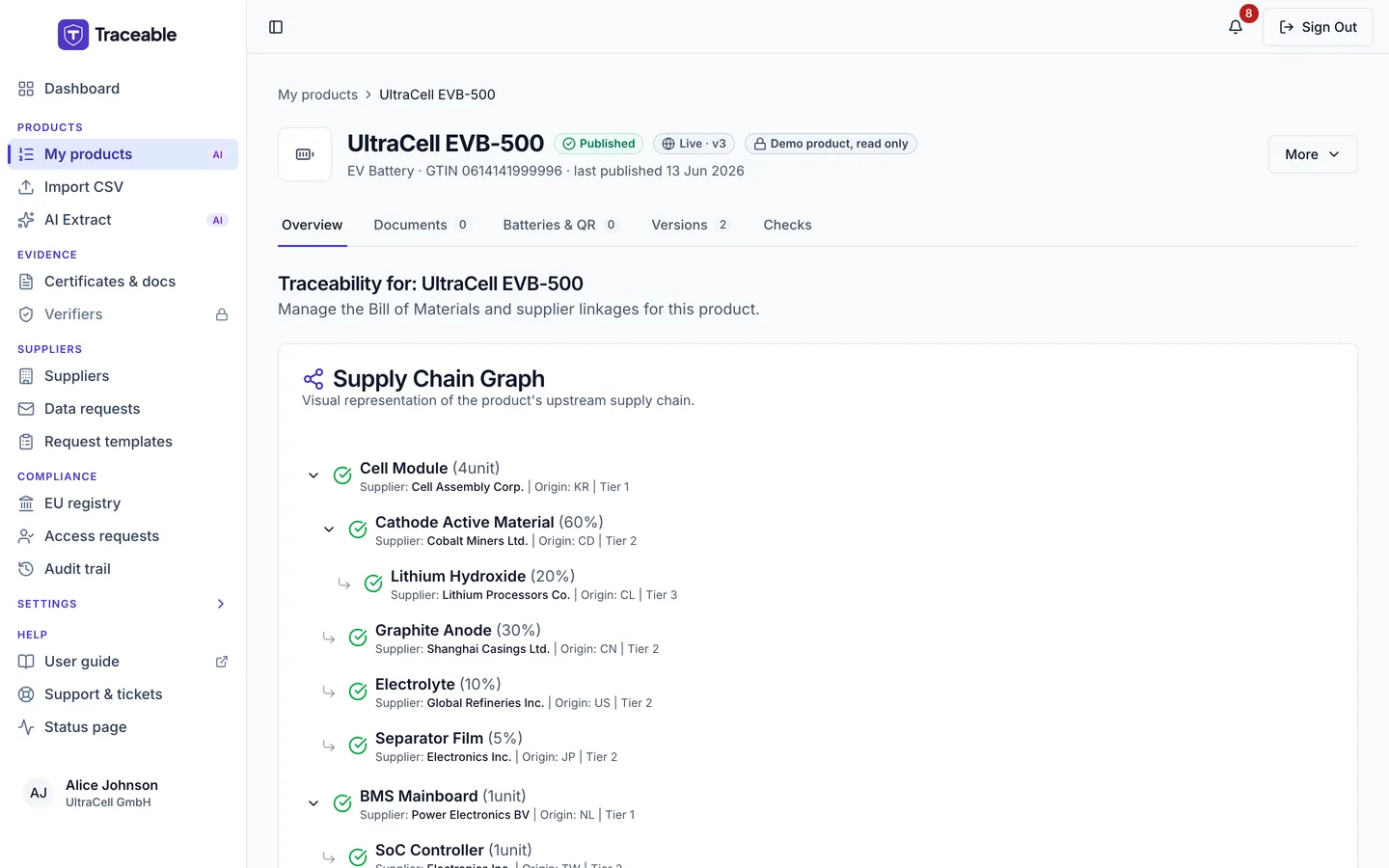
Product traceability.
What the traceability page shows
The page has two panels, followed by a component part-numbers section:
- Supply Chain Graph: the product's upstream supply chain as a nested list, one entry per record, showing the material or component name, its origin and its tier. When no records exist it reads "No traceability data to display."
- Bill of Materials (Table View): one row per record, with the columns Material / Component, Qty, Source, Origin and Status, and an actions menu on each row. The panel subtitle reads "All materials and components required for this product."
- Component part numbers: use Add Component with Component Name, Component Type, Quantity, an optional manufacturing date, lot / batch number, facility name and facility location.
Source is the supplier or, where the record links another product's DPP, that product. Status is one of Pending, Verified, Rejected or Invited.
The row menu offers Approve and Reject (Pending only), Edit Record, Invite Supplier and Delete (no confirmation).
Adding a material
- Open the product's traceability page.
- Click Add Material.
- Complete the fields below.
- Select Add Material in the dialog (it reads Save Changes when editing).
| Field | Description |
|---|---|
| Material/Component Name | What was supplied (e.g. "Lithium Carbonate" or "Battery Pack Assembly"). At least 2 characters. |
| Quantity and Unit | The amount used. Quantity must be greater than zero. Unit can be kg, %, g or unit. |
| Link to Existing DPP (Optional) | Another product's DPP that this material or component comes from |
| Supplier (if not linking a DPP) | The supplier that provided it |
| Tier | The supply chain tier of the record. A whole number of 1 or more. |
| Origin (ISO Code) | The country of origin, as a 2-letter ISO country code (e.g. "CD") |
| Is Recycled | Whether the material is recycled |
| Conflict Mineral | Whether the material is a conflict mineral |
| Critical Raw Material (CRM) | Whether the material is a critical raw material |
| Pre-Consumer Recycled %, Post-Consumer Recycled %, Bio-based % | Composition details for the material, each 0 to 100 |
Either a Supplier or a Linked DPP is required, otherwise the form says "Either a Supplier or a Linked DPP must be selected." The dialog groups the CRM switch and the percentages under "Composition Details".
Repeat for each material or component relevant to this product.
The Bulk Upload button does not import records itself. It opens a dialog "Bulk Upload Bill of Materials" with a drop zone and a Download CSV Template link. Upload & Process closes it with the toast "Use the CSV Import tool from the main products page for bulk traceability uploads."
Traceability depth
The Tier field lets you record your direct (tier-1) suppliers and, beyond them, your suppliers' suppliers (tier-2 and further). The Supply Chain Graph nests the records by tier.
Example for a lithium-ion EV battery pack:
- Tier 1: "NMC battery cells", origin KR
- Tier 2: "Lithium nickel manganese cobalt oxide precursor", origin JP
- Tier 3: "Lithium carbonate", origin CL
Each of these is a separate traceability record linked to this product.
Traceability and publishing
For non-battery categories that require traceability, the publish check blocks publishing until the product has at least one traceability record or the attestation "I confirm no external suppliers requiring traceability records" is ticked in the Supply Chain Due Diligence step. For battery categories the platform does not check for traceability records, so missing records neither block publishing nor appear as a recommendation.
Traceability records are kept separately from the DPP form.